Entry #8
2026-06-15
7 min read
Split 1.2, lifted by the community
The beginning
At the beginning of the year I launched Split workout tracker, an offline-first, privacy-first, and simple workout tracker.
The app was built for my needs to solve a problem I was having: keeping my gym routine organized instead of scattered across my notes app.
I was never interested in seeing how much I'd lifted overall. What I cared about was knowing what exercise comes next, how many sets and kilos, and how many sets I'd completed last time. I don't have a great memory for tracking so many variables, so I'd been keeping it all in notes.
It worked, but it was annoying to edit and hard to understand at a glance. Adding new exercises or reorganizing things around was tedious.
That's why I created Split workout tracker have a better UI that displayed all that information in a way that was easy to use, update, and organize.
How the app works
The app is specialized for PPL routines (Push, Pull, Legs). You can create as many routines as you want, add all the days you want, but each day must contain either Push, Pull, or Leg exercises. Then, within each day, you can add all the exercises you want for that session.
The app provides around 250–300 pre-registered exercises, but you can also add your own. You select your weight, number of sets, and reps.
Beyond that, the UI is very simple.
Each day displays a row for each exercise with the weight, reps, and sets. For each set, there's a circle you can toggle as you complete it. Next time you come back to that day, you can easily see how much you lifted.
That's it.
People found the app
The most marketing I did was comment on a couple of Reddit posts after I published the app. Nothing else.
I created the app as free, so honestly, I didn't want to spend any more time on it. It was perfect for me, that was the most important thing.
But small, steady downloads kept coming every day. People were finding it useful. Looking at the Apple Connect stats, it seemed ASO (App Store Optimization) was working well. Many downloads came from Google results and even ChatGPT recommendations.
On the settings page, I added a link to a Google form with a few simple questions about the experience and if there was anything missing.
No stats was feature not the gap
When I created the app, I kept it as simple as described. I didn't need stats or progress tracking. It wasn't a solution to my problem.
Most of my downloads came from users with the same mindset. But even though the app is described that way, every now and then I'd get messages saying there was no way to see past workouts or track progress.
These weren't bad criticisms, they were actually suggestions from people for whom stats would be useful. For a while, I dismissed it. I thought: if you want that kind of app, go use one of the thousands of others on the App Store. I didn't want to compete with well-established apps and do "ALL".
But deep down, I felt they might have a point. Maybe I should add it somehow without changing what makes Split special, the simplicity.
The challenge: how?
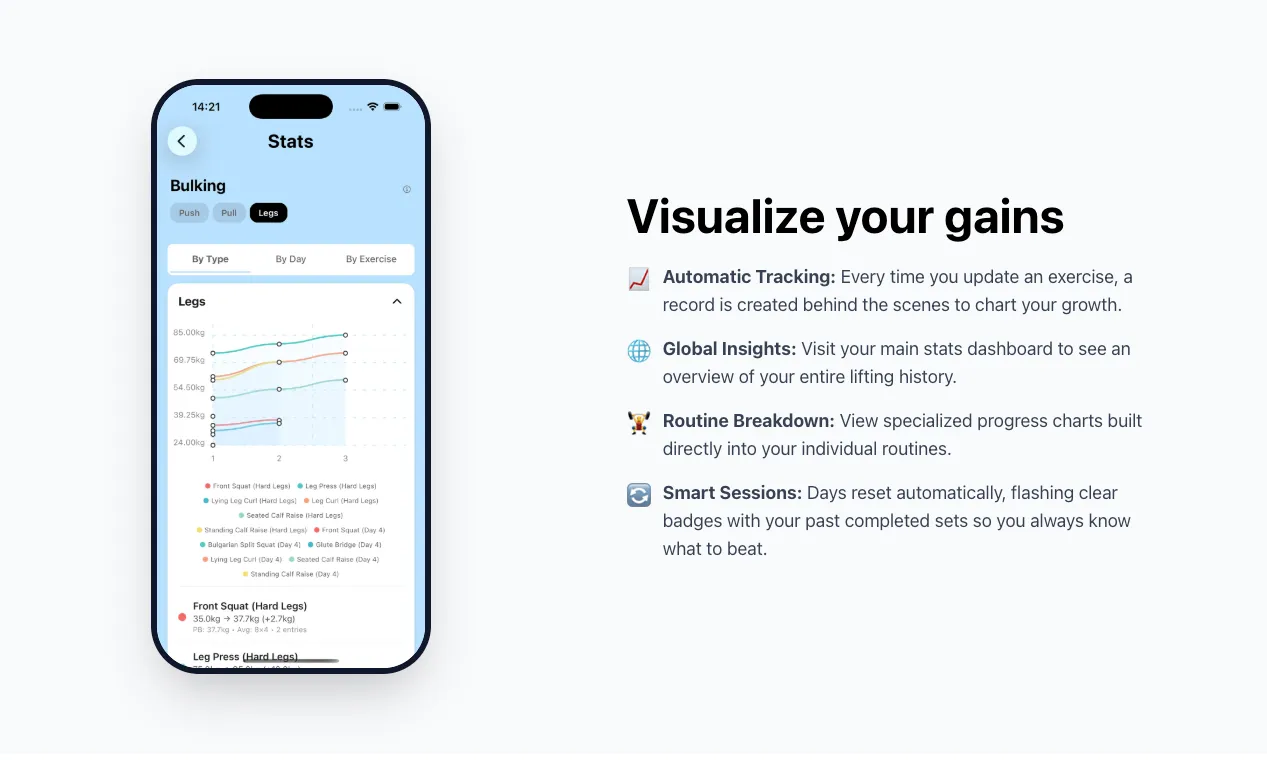
Okay, I decided to add a stats page. But how? How do I track it, and more importantly, how do I do it without adding another step to the workflow or changing how the app fundamentally works?
The last thing I wanted was that kind of app where you click a "start workout" button before your session begins. I also didn't want users to manually enter their workout data or create a separate screen just for logging.
It needed to be seamless.
What to store
Until now, the app stored workout information grouped by routine. Each routine could have multiple days, and each day could have multiple exercises.
Each exercise had a name, sets, weight, and other details, all connected by day ID and routine ID. Plus, each exercise referenced the pre-defined exercise data the app offered.
So if you selected "Squats" from the app's pre-defined exercises and changed the language to Spanish, you'd see "Sentadillas."
The most important bit was the "completed sets" data because that's what persisted and showed you how many sets you actually did last time.
So you'd have: Squats in your leg day with 50kg and 4 sets of 8–10. The app had a simple UI with 4 dots you could toggle as you completed each set. Next time you came back, you'd see that you'd completed 3 of 4 sets, so you'd know if you did better than last time and if it was time to increase weight.
The logging problem
But now I needed to make that day's workout log persistent while also showing how much you did last time. Here was the problem: if I completed 3 sets, the log would say "3 sets completed on X day." But the UI needs to reset every day, it shouldn't show 3 sets on your next workout; it should reset to 0. And I didn't want users manually resetting it every time they start again.
It was a paradox: I needed the data to persist for stats, but the interface to reset cleanly every session.
The solution
So I automated everything behind the scenes. Routine exercises reset to 0 completed sets every time you open the app on a new date. Logs only create when you actually toggle completed sets. If you change a completed set from 1 to 2, it updates the same log. If you change other parameters for that exercise, it creates a new log.
Since the completed sets reset every time, there was no way to know how many sets you did last time. So I added a small badge showing how many sets you completed the last time you did that exercise.
A few big changes rippled through the app. Multiple UI updates. Multiple small fixes meant multiple changes in different places. I had to rewrite parts of the core without changing how it looked on the surface. I tested multiple times in multiple ways, fixing bugs as I found them, and as usual, every solution sparked a new idea to make it work better.
Since perfectionism is the enemy of progress, I decided to stop once I found no more bugs and I was happy with the result.
What started as a weekend refactor turned into multiple days of work, mostly on the following weekends, but also during lunch breaks and after work.
Why I did this
Building evolved from creating software just for myself to building for multiple users in multiple languages. I've built software for big projects and companies. I've built apps where users paid from the start. But part of me still loves building for the community free to use, share, and enjoy.
Because building isn't always about profit. It's about finding a solution you wish existed.
Split is still free. Will it remain free forever? Probably yes. Would I like to be compensated for the work I've put in? Definitely. But knowing that other people find the app useful every day is more than enough.
Try Split 1.2:
split-workout.maxiruti.com
Download:
Split Workout Tracking App - App Store
Download Split Workout Tracking by Maximiliano Adrian Ruti on the App Store. See screenshots, ratings and reviews, user tips, and more apps like Split Workout…